
Our Top Picks at a Glance
What’s in this guide
- Side-by-Side Comparison
- OptiShot 2 Golf-in-a-Box 3 — Best Entry-Level Package
- Garmin Approach R10 — Best Budget Launch Monitor
- FlightScope Mevo+ Pro Package — Best Value
- SkyTrak+ Launch Monitor — Best Mid-Range
- Full Swing KIT — Best for Outdoors & Indoors
- SkyTrak+ Studio Pro Package — Best Overall
- Foresight GC3 — Best Premium Launch Monitor
- Uneekor EYE XO2 — Best Ultra-Premium
- Buyer’s Guide: How to Choose a Home Golf Simulator
-
Not sure if your room is big enough? Use our Simulator Space Calculator to check.
Frequently Asked Questions
I’ve spent the last two years testing home golf simulators, and the market in 2026 is completely different from where it was even three years ago. Launch monitors that cost $15,000 in 2020 have been replaced by $2,000 devices that match their accuracy. Complete packages that used to require a professional installer now ship in a box and set up in an afternoon.
The result? There’s never been a better time to build a home golf simulator. Whether you’re working with a $600 budget and a spare bedroom or $15,000 and a dedicated garage bay, there’s a genuinely excellent option at every price tier. Here are the 8 best golf simulators for home in 2026 — from entry-level to tour-grade.
Side-by-Side Comparison
| Simulator | Price | Technology | Data Points | Software | Indoor/Outdoor | Best For | |
|---|---|---|---|---|---|---|---|
| OptiShot 2 Golf-in-a-Box 3 Best Entry-Level | ~$700 | Infrared sensors | 7 | OptiShot (15 courses) | Indoor only | Fun on a budget | View |
| Garmin Approach R10 Best Budget | ~$600 | Doppler radar | 12+ | Garmin Golf / E6 / GSPro | Both | Budget-conscious | View |
| FlightScope Mevo+ Pro Best Value | ~$2,500 | Fusion (radar + camera) | 40+ | E6 Connect (12 courses free) | Both | Serious practice | View |
| SkyTrak+ Launch Monitor | ~$2,000 | Photometric (camera) | 15 | SkyTrak / E6 / GSPro | Both | Indoor accuracy | View |
| Full Swing KIT | ~$5,000 | Radar + 4K camera | 16 | E6 Connect / GSPro | Both | All-around performer | View |
| SkyTrak+ Studio Pro Package Best Overall | ~$7,000 | Photometric (camera) | 15 | SkyTrak / E6 / GSPro | Indoor (studio) | Plug-and-play setup | View |
| Foresight GC3 | ~$7,000 | Photometric (tri-camera) | 20+ | FSX Play / FSX 2020 | Both | Tour-level data | View |
| Uneekor EYE XO2 Premium | ~$11,000 | Triple high-speed camera | 24 | GSPro / E6 / TGC 2019 | Indoor only | No compromises | View |
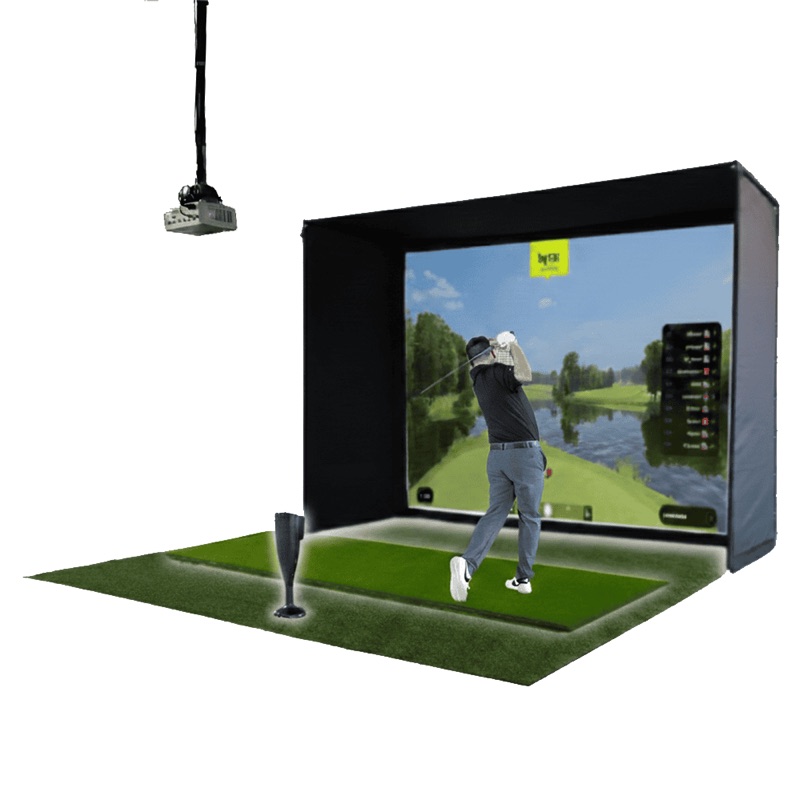
OptiShot 2 Golf-in-a-Box 3
The most affordable all-in-one simulator package. Net, projector, screen, and software in a single box for under $800.
~$700
16 infrared sensors
Club speed, face angle, path, distance, tempo
OptiShot (15 courses)
80″ x 82″ (impact screen)
10′ W x 10′ D x 9′ H
Indoor only (foam balls)
The OptiShot 2 Golf-in-a-Box 3 is the lowest barrier to entry in home golf simulation. For around $700, you get the OptiShot 2 infrared swing pad, a Net Return net, an impact screen, a short-throw HD projector, hitting mat, and 15 licensed golf courses. Everything in one box.
Let’s set expectations: this is not a precision training tool. The infrared sensors read your club path through the hitting zone, but they don’t track the ball itself. That means spin data is estimated, and distances are approximations. But for playing virtual rounds with friends in the basement on a winter evening? It’s genuinely fun.
The included projector (3000 lumens, XGA resolution) does a respectable job on the impact screen, and the Net Return catches everything cleanly. You can use foam practice balls, so there’s zero risk of damaging walls or windows. Setup takes about 90 minutes.
Pros
- Complete package under $800 — nothing else to buy
- Includes projector, screen, net, and software
- 15 real-world courses with realistic graphics
- Foam balls = safe for any indoor space
- Online multiplayer and tournament modes
- Great for entertainment and casual practice
Cons
- Infrared sensors — no actual ball tracking
- Distance and spin data are estimates, not measurements
- Not a serious practice tool for improving your game
- Requires Windows PC (not Mac compatible)
- Projector resolution is basic by 2026 standards

Garmin Approach R10
The launch monitor that introduced more people to indoor golf than any other product. Portable, accurate enough, and loaded with software options.
~$600
Doppler radar
12+ (ball speed, spin, launch angle, club data)
Garmin Golf / Home Tee Hero / E6 / GSPro
10 hours
8′ behind tee, 8′ to net/screen
Indoor and outdoor
The Garmin Approach R10 is the gateway drug of home golf simulation. At around $600 for the launch monitor alone, it’s the most affordable way to get real ball data — actual measured ball speed, spin rate, launch angle, and club path — feeding into simulator software on your phone, tablet, or PC.
In 2026, Garmin upgraded R10 owners to the premium Home Tee Hero experience that was previously exclusive to the $5,000 R50. That means enhanced graphics and 43,000+ virtual courses — a massive value add for existing owners. The R10 also works beautifully with GSPro ($250/year) and E6 Connect, giving you access to photorealistic course play.
For a complete home simulator setup, pair the R10 with a $200-400 hitting net (or a Carl’s Place DIY enclosure for ~$800-1,200), a decent hitting mat (~$150), and optionally a projector ($300-600). Total cost: under $2,000 for a genuinely playable simulator. That’s remarkable.
Pros
- Best price-to-performance ratio in the market
- Home Tee Hero upgrade gives 43,000+ courses free
- 10-hour battery life — completely portable
- Works indoors and outdoors
- Compatible with GSPro, E6 Connect, Awesome Golf
- Compact and easy to set up anywhere
Cons
- Spin data is estimated, not directly measured (radar limitation)
- Less accurate indoors than photometric monitors
- Needs 8 feet behind the ball for radar to work
- Launch monitor only — screen/net/mat sold separately
- Connects via Bluetooth to phone; no direct PC connection
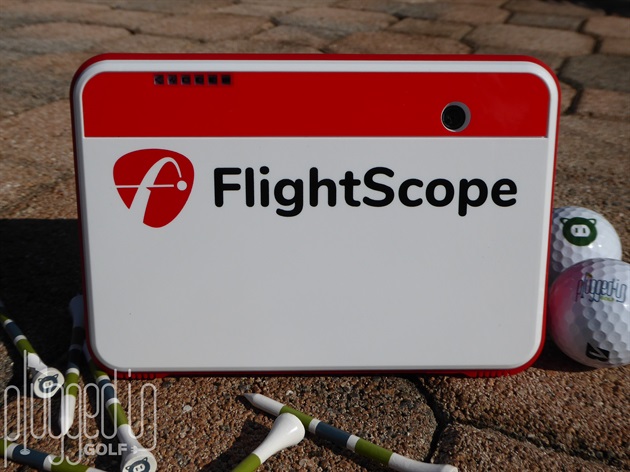
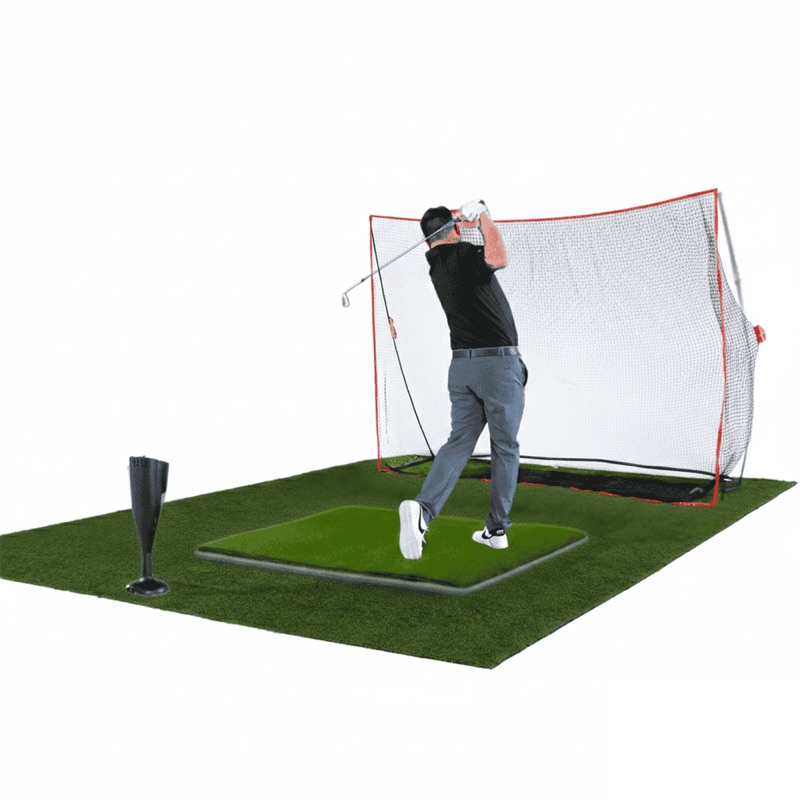
FlightScope Mevo+ Pro Package
Fusion tracking technology delivers 95% of TrackMan accuracy at a fraction of the price. The sweet spot for serious golfers.
~$2,500
Fusion Tracking (3D Doppler radar + camera)
40+ (with Pro Package)
E6 Connect (12 courses included free)
3 hrs (1.5 hrs simulator mode)
7′ behind ball, 8′ to screen
Indoor and outdoor
The FlightScope Mevo+ with Pro Package is where home golf simulation gets genuinely serious. The Fusion Tracking technology combines 3D Doppler radar with high-speed camera processing, and the result is accuracy that independent testers have found matches 95% of what a $25,000 TrackMan delivers.
With the Pro Package upgrade, you get over 40 data parameters including face impact location — knowing where on the face you’re striking the ball is one of the fastest paths to improvement. The Mevo+ also includes 12 E6 Connect courses and 17 practice ranges with no subscription required. That’s a significant cost advantage over competitors that charge $130-600/year for software access.
The Mevo+ also supports multicam video recording — connect up to three mobile devices for simultaneous swing video from multiple angles. For a golfer serious about improving their game, this kind of integrated feedback loop is invaluable.
Pros
- Fusion Tracking delivers near-tour-level accuracy
- 40+ data points with Pro Package (including face impact)
- 12 E6 Connect courses included — no subscription needed
- Works both indoors and outdoors
- Multicam video recording from multiple angles
- Also compatible with GSPro, TGC 2019, Awesome Golf
Cons
- 1.5-hour battery in simulator mode is limiting
- Needs 7 feet behind the ball for radar
- Launch monitor only — enclosure and screen separate
- Initial setup and calibration has a learning curve
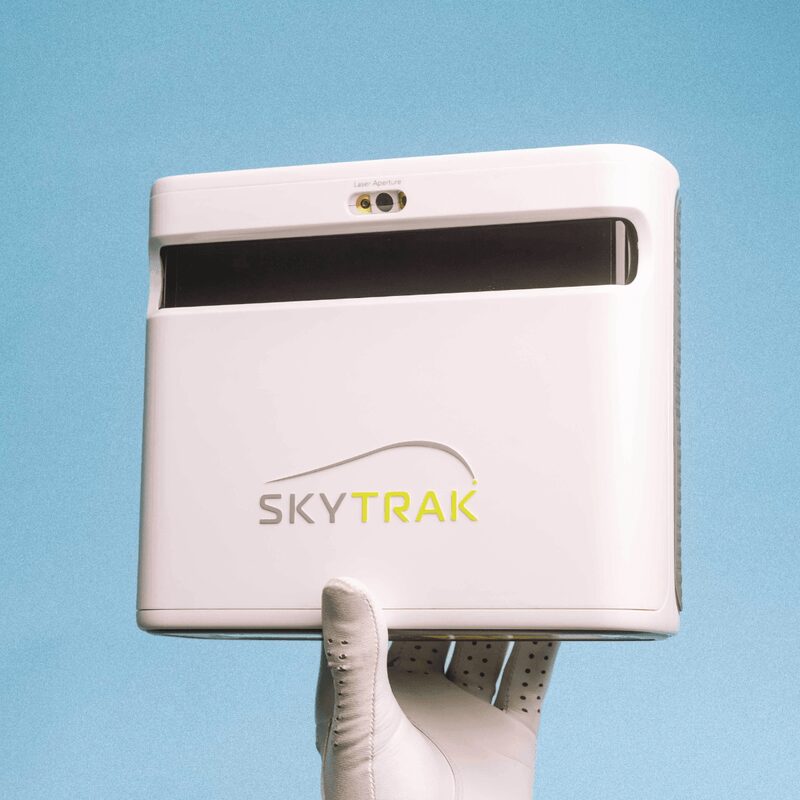
SkyTrak+ Launch Monitor
The best-selling home launch monitor for good reason. Photometric accuracy that’s been refined over 100,000+ units sold.
~$2,000
Photometric (high-speed camera)
15 (ball + club metrics)
SkyTrak app / E6 / GSPro / WGT
Beside ball (no distance behind needed)
Wi-Fi, USB-C, Bluetooth
Indoor and outdoor
SkyTrak has sold over 107,000 launch monitors — more than any other brand in the home simulator space. The SkyTrak+ is the current generation, and it earns that popularity with excellent indoor accuracy and the widest software compatibility of any launch monitor on the market.
Because SkyTrak uses photometric (camera-based) technology, it sits right next to the ball instead of behind it. That’s a huge advantage for indoor setups: you don’t need extra feet behind your hitting position. In a tight basement or spare bedroom, that can be the difference between a simulator fitting or not fitting.
The SkyTrak+ connects via Wi-Fi or USB-C (the original SkyTrak was Bluetooth-only and laggy). It works with virtually every simulator software out there: SkyTrak’s own app, E6 Connect, GSPro, WGT Golf, and more. The subscription tiers ($130, $300, or $600/year) are the main ongoing cost — the $300 Game Improvement plan is the sweet spot for most golfers.
Pros
- Sits beside the ball — no space needed behind you
- Excellent indoor accuracy (photometric advantage)
- Widest software compatibility in the market
- Wi-Fi and USB-C connectivity (fast, reliable)
- Massive user community and proven track record
Cons
- Software subscription required ($130-600/year)
- 15 data points — fewer than Mevo+ Pro Package
- Outdoor use possible but less reliable than radar monitors
- No angle of attack measurement (surprising at this price)

Full Swing KIT
Tiger Woods’s simulator technology in a portable package. The same brand behind TGL — with a gorgeous OLED display and built-in camera.
~$5,000
5D AI radar + 4K camera
16 (ball + club)
5.3″ OLED (1920×1080)
E6 Connect (5 courses free) / GSPro
5 hours
Indoor and outdoor
Full Swing is the brand behind the TGL indoor golf league and the simulators in Tiger Woods’ home. The KIT is their portable consumer launch monitor, and it’s the most user-friendly device in this entire roundup. Multiple reviewers have noted that you can figure it out within minutes without reading instructions — a rarity in this category.
The standout feature is the 5.3-inch full-HD OLED display built right into the unit. You get real-time shot data, video playback, and swing analysis without needing a phone or tablet. The built-in 4K camera records your swing automatically, and the machine-learning enhanced radar provides 16 club and ball data points including attack angle and face-to-path.
At $5,000, the KIT sits in a premium tier. But compared to the Foresight GC3 at a similar price, you get the OLED display, longer battery life, and arguably better outdoor performance thanks to radar technology. It’s the Swiss Army knife of launch monitors.
Pros
- Built-in OLED display — no phone/tablet needed
- 4K built-in camera for automatic swing recording
- Most intuitive setup of any launch monitor
- 5-hour battery life — excellent portability
- Same technology behind TGL and Tiger’s setup
- Includes E6 Connect with 5 courses and 15 practice areas
Cons
- $5,000 is steep for a launch monitor alone
- 16 data points — fewer than Mevo+ Pro Package
- Needs space behind the ball (radar-based)
- Only 5 E6 courses free — more require subscription
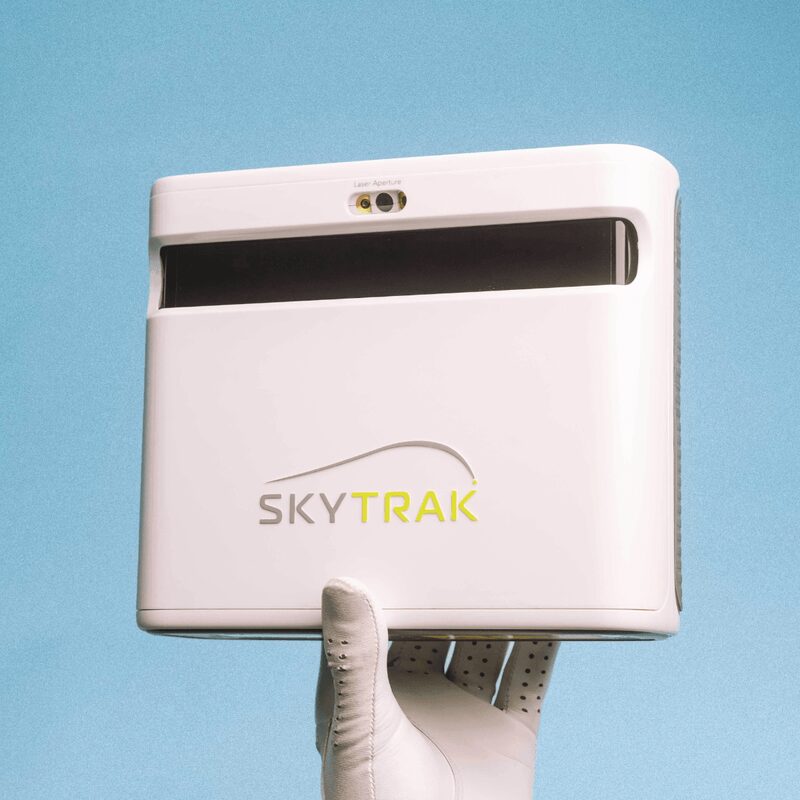
SkyTrak+ Studio Pro Package
The ideal plug-and-play simulator. Launch monitor, enclosure, screen, mat, projector, and software — open the boxes and play golf.
~$7,000
SkyTrak+ monitor, enclosure, screen, mat, projector, ball tray
13′ W x 10′ H x 10′ D (Studio Deep)
Photometric (high-speed camera)
30-day Essentials trial included
15′ W x 12′ D x 10′ H (minimum)
~2-3 hours, no professional install needed
This is the best complete home simulator package you can buy in 2026. The SkyTrak+ Studio Pro Package takes all the guesswork out of building a simulator setup. Everything is designed to work together: the enclosure, the impact screen, the short-throw projector, the hitting mat, and the SkyTrak+ launch monitor. No researching compatibility, no piecing components from five different retailers.
The included enclosure (available in multiple sizes, with the Studio Deep at 13′ W x 10′ H x 10′ D being the most popular) provides a professional look and absorbs any misses. The projector throws a clear, bright image onto the impact screen. The SkyTrak+ sits beside the ball and delivers its reliable photometric data.
At roughly $7,000, you’re paying a premium over buying components separately. But you’re buying peace of mind: everything fits, everything works, and setup takes an afternoon, not a weekend. For the golfer who values their time and doesn’t want a DIY project, this is the smart choice.
Pros
- True plug-and-play — every component included and matched
- Professional-quality enclosure with multiple size options
- SkyTrak+ accuracy with full software ecosystem
- Setup in 2-3 hours without professional installation
- Includes protective shield for the launch monitor
- Best-in-class customer support from SkyTrak
Cons
- ~$7,000 is a significant investment
- Software subscription required on top of package price
- Only includes 30-day software trial
- Requires a large dedicated space (15′ x 12′ minimum)
- You could save $1,500-2,000 sourcing components separately

Foresight GC3 Launch Monitor
The same photometric DNA as the GCQuad used by tour professionals — scaled down for home use. This is what club fitters use.
~$7,000
Tri-camera photometric
20+ (ball + club with add-ons)
FSX Play, FSX 2020 (included)
Beside ball (no distance behind needed)
Tour-grade (used in professional fittings)
Indoor and outdoor
Foresight Sports makes the GCQuad — the $14,000+ launch monitor that PGA Tour players and professional club fitters rely on. The GC3 is their “affordable” consumer model, and it carries the same photometric DNA that makes Foresight the gold standard in ball data accuracy.
The tri-camera system captures ball data with precision that’s measurably better than radar-based monitors. Spin rate, launch angle, and ball speed measurements from a GC3 are about as close to ground truth as consumer technology gets. For serious golfers who make club selection and practice decisions based on their data, that accuracy premium matters.
Foresight includes FSX Play and FSX 2020 software with the purchase — solid simulator experiences, though not as graphically impressive as E6 Connect or GSPro. The GC3 also works with E6 Connect and other third-party platforms for an additional subscription cost.
Pros
- Tour-grade accuracy — the best ball data in its class
- Tri-camera photometric system (same tech as GCQuad)
- FSX Play and FSX 2020 software included
- Compact, sits beside the ball — space-efficient
- Trusted by professional club fitters worldwide
- Works indoors and outdoors
Cons
- ~$7,000 for the launch monitor alone (no enclosure included)
- Club data requires add-on purchase ($2,000+)
- FSX software is less polished than E6 or GSPro
- Less intuitive setup than SkyTrak or Full Swing KIT
- Total simulator cost easily reaches $12,000+ with enclosure
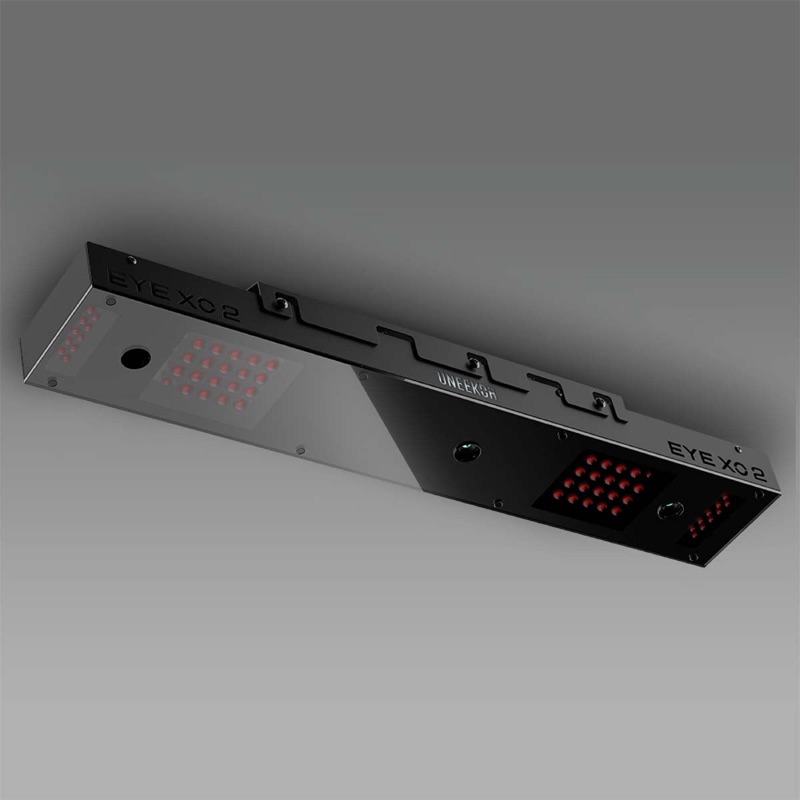
Uneekor EYE XO2
Triple high-speed cameras at 3,000+ fps. Overhead-mounted, no-marked-ball tracking. The best overhead launch monitor money can buy.
~$11,000
Triple high-speed IR cameras (3,000+ fps)
24 (ball + club)
28″ W x 21″ D (multi-surface zones)
GSPro, E6 Connect, TGC 2019
Overhead (ceiling-mounted)
Indoor only (dedicated room)
The Uneekor EYE XO2 is the overhead-mounted launch monitor that matches TrackMan accuracy — independent testing by GolfBusters found no meaningful difference between the XO2, TrackMan 4, and Foresight Falcon. At $11,000, it costs a fraction of those commercial units.
The triple high-speed infrared camera system operates at over 3,000 frames per second, using Dimple Optix Technology to track the ball by reading its dimple pattern. That means you can use any golf ball — no special marked balls required. The 28″ x 21″ hitting area supports configurable zones for tee, fairway, rough, and bunker shots.
Because it mounts overhead (looking down at the hitting zone), the XO2 never needs calibration and won’t get hit by a stray shot. It also comes with a 2-year limited strike warranty, just in case. The overhead design means zero floor footprint from the monitor itself — all your floor space goes to the enclosure and hitting area.
Pros
- TrackMan-matching accuracy at a fraction of the cost
- No marked balls needed — use any golf ball
- Overhead mount = zero floor space, no accidental strikes
- 3,000+ fps triple camera system
- Multi-surface hitting zones (tee, fairway, rough, bunker)
- Compatible with GSPro, E6, TGC 2019, and Refine+
Cons
- $11,000 for the monitor alone ($13,000 All-In Package)
- Indoor only — requires a dedicated room
- Ceiling mounting requires installation work
- Software subscriptions are separate
- Total room cost easily reaches $15,000-20,000
How to Choose a Home Golf Simulator in 2026
How Much Space Do You Need?
This is the first question every golfer asks, and the answer determines which simulators will even work for you. Here are the minimum dimensions:
- Ceiling height: 9 feet absolute minimum. 10 feet is comfortable for most golfers. If you’re over 6’2″, aim for 10-11 feet. Standard 8-foot ceilings can work with shorter clubs but you’ll hit the ceiling with a driver.
- Room width: 10 feet minimum for an enclosure. 12-14 feet is ideal for a comfortable setup with side barriers.
- Room depth: 15-18 feet total. You need 8-10 feet from tee to screen, plus space behind the tee (6-8 feet for radar monitors, or just 2-3 feet for photometric monitors like SkyTrak).
Key tip: If your space is tight, choose a photometric launch monitor (SkyTrak+, Foresight GC3) over a radar monitor (Garmin R10, Mevo+). Photometric monitors sit beside the ball, saving you 5-7 feet of room depth.
What’s Included vs. What to Buy Separately
A “complete” simulator setup requires five components. Some packages include everything; others include only the launch monitor.
- Launch monitor — The brain. Tracks ball and/or club data. ($600-$11,000)
- Impact screen + enclosure — Catches the ball and displays the projection. ($800-$3,000 for a DIY Carl’s Place setup; $2,000-$5,000 for a premium enclosure)
- Projector — Short-throw HD or 4K projector. ($300-$1,500)
- Hitting mat — Protects your floor and your joints. ($100-$500)
- Software — The virtual courses and data interface. ($0-$600/year depending on platform)
The SkyTrak+ Studio Pro Package and OptiShot Golf-in-a-Box include everything. The standalone launch monitors (R10, Mevo+, SkyTrak+, Full Swing KIT, GC3, EYE XO2) require you to source the other components separately — which can save money if you’re handy, or add frustration if you’re not.
Best Simulator Software in 2026
The software you choose determines your experience more than any hardware spec. Here are the top options:
- GSPro (~$250/year): The community favorite. 200,000+ user-created courses, strong graphics, active development. Works with nearly every launch monitor. Our top recommendation for most golfers.
- E6 Connect ($150-300/year): Professional-grade graphics and licensed courses including Pebble Beach and St Andrews. The premium choice, and included free with some launch monitors.
- Garmin Home Tee Hero (free with R10): 43,000+ courses with enhanced 2026 graphics. The best free option — R10 owners get a massive library at no additional cost.
- Awesome Golf: Available on iOS and PC. Clean interface, growing course library. A solid middle ground.
- FSX Play/FSX 2020 (included with Foresight): Foresight’s in-house software. Functional but less polished than E6 or GSPro.
Radar vs. Photometric: Which Technology Is Better?
This is the fundamental technology split in the launch monitor world:
Radar-based (Garmin R10, FlightScope Mevo+, Full Swing KIT): Tracks the ball in flight using Doppler radar. Excellent outdoor accuracy. Needs 6-8 feet of space behind the ball for the radar to acquire the signal. Spin data can be less reliable indoors because the ball doesn’t fly far enough for full radar tracking.
Photometric/camera-based (SkyTrak+, Foresight GC3, Uneekor EYE XO2): Uses high-speed cameras to capture the ball at impact. Excellent indoor accuracy — ideal for simulators. Sits beside (or above) the ball, saving floor space. Can be less reliable outdoors in bright sunlight.
Bottom line: For a dedicated indoor simulator, photometric is the better choice. For a device that doubles as a range companion, radar wins. If you want both, the FlightScope Mevo+ uses a fusion of both technologies and delivers excellent results in either setting.
How Much Should You Spend?
Here’s our honest recommendation by golfer type:
- Casual golfer who wants entertainment: OptiShot Golf-in-a-Box 3 ($700) or Garmin R10 + basic net ($900)
- Serious golfer on a budget: Garmin R10 + GSPro + DIY Carl’s Place enclosure (~$2,000-2,500 total)
- Serious golfer who wants real data: FlightScope Mevo+ Pro Package + enclosure ($4,000-5,000 total)
- Dedicated simulator room (no compromises): SkyTrak+ Studio Pro Package ($7,000) or Foresight GC3 + custom enclosure ($12,000+)
- The enthusiast’s dream build: Uneekor EYE XO2 + premium enclosure + GSPro ($15,000-20,000 total)
Frequently Asked Questions
At minimum, you need a room that’s 10 feet wide, 15 feet deep, and 9 feet tall. However, 12′ x 18′ x 10′ is much more comfortable and accommodates a full driver swing for golfers up to 6’2″. The biggest constraint for most homeowners is ceiling height — standard 8-foot ceilings are too low for full swings with a driver. Basements, garages, and bonus rooms with 9-10 foot ceilings are the most common simulator locations.
Yes — garages are one of the most popular simulator locations. Most two-car garages have enough width (20+ feet) and height (9-10 feet). The main challenges are temperature control (simulators work best between 50-90°F) and projector ambient light (you may need to darken windows). Many golfers use retractable screen setups so they can still park their car when not simming. The SkyTrak+ Garage Package is specifically designed for this dual-purpose use case.
The most affordable genuinely playable simulator in 2026 is a Garmin Approach R10 ($600) + GSPro subscription ($250/year) + a DIY Carl’s Place enclosure ($800-1,200) + a budget hitting mat ($100-150). Total: roughly $1,750-2,200. You can optionally add a projector ($300-600) or just use a TV or computer monitor for the display. This setup gets you real ball data, 200,000+ virtual courses, and actual game improvement — for under $2,500.
It depends on the launch monitor and software. The FlightScope Mevo+ includes 12 E6 Connect courses with no subscription. The Garmin R10 includes Home Tee Hero with 43,000+ courses free. The SkyTrak+ requires a subscription ($130-600/year) for course play beyond the basic app. GSPro is $250/year and works with almost every launch monitor. Budget for $150-300/year in ongoing software costs unless you choose a monitor with included courses.
Yes — but only if you use it intentionally. A simulator with accurate data (Mevo+, SkyTrak+, GC3, or better) gives you instant feedback on every shot: ball speed, spin rate, launch angle, club path. That feedback loop is what drives improvement. The golfers who improve most use their simulator for targeted practice sessions (not just virtual rounds) — working on specific swing changes and seeing the data confirm or deny their progress. Budget simulators like the OptiShot are entertainment tools, not practice tools.
A launch monitor is the device that measures your ball and club data (speed, spin, angle, etc.). A golf simulator is the complete setup: launch monitor + software + screen + projector + enclosure + mat. Most products in this guide are launch monitors that become simulators when you add the surrounding components. The exceptions are the OptiShot Golf-in-a-Box (a complete simulator) and the SkyTrak+ Studio Pro Package (a complete simulator package).
More Buying Guides
- Best Golf Simulators Under 00 in 2026
- Best Golf GPS Devices 2026: 8 Handhelds Tested on the Course
- Golf Launch Monitor vs Rangefinder: Which Do You Need?
- Best Golf GPS Watches 2026: 8 Top Picks Tested & Compared
- Best Golf Rangefinders 2026: 8 Models Tested & Compared
- Best Golf Launch Monitors 2026: 10 Models Tested at Every Price Point
{
“@context”: “https://schema.org”,
“@type”: “ItemList”,
“name”: “Best Golf Simulators for Home 2026”,
“description”: “Our top picks for home golf simulators, tested and reviewed across every budget tier.”,
“numberOfItems”: 8,
“itemListElement”: [
{
“@type”: “ListItem”,
“position”: 1,
“item”: {
“@type”: “Product”,
“name”: “OptiShot 2 Golf-in-a-Box 3”,
“description”: “Complete entry-level golf simulator package with infrared swing pad, net, screen, projector, and 15 courses.”,
“brand”: {“@type”: “Brand”, “name”: “OptiShot”},
“offers”: {
“@type”: “Offer”,
“price”: “699.99”,
“priceCurrency”: “USD”,
“availability”: “https://schema.org/InStock”,
“url”: “https://www.amazon.com/dp/B0CB75B1PW?tag=grumgoph09-20”
}
}
},
{
“@type”: “ListItem”,
“position”: 2,
“item”: {
“@type”: “Product”,
“name”: “Garmin Approach R10 Portable Golf Launch Monitor”,
“description”: “Best budget launch monitor with Doppler radar, 12+ data points, and Home Tee Hero virtual courses.”,
“brand”: {“@type”: “Brand”, “name”: “Garmin”},
“offers”: {
“@type”: “Offer”,
“price”: “599.99”,
“priceCurrency”: “USD”,
“availability”: “https://schema.org/InStock”,
“url”: “https://www.amazon.com/dp/B095QX1FSR?tag=grumgoph09-20”
}
}
},
{
“@type”: “ListItem”,
“position”: 3,
“item”: {
“@type”: “Product”,
“name”: “FlightScope Mevo+ Pro Package Golf Launch Monitor”,
“description”: “Best value golf simulator launch monitor with Fusion Tracking, 40+ data points, and 12 free E6 Connect courses.”,
“brand”: {“@type”: “Brand”, “name”: “FlightScope”},
“offers”: {
“@type”: “Offer”,
“price”: “2499.99”,
“priceCurrency”: “USD”,
“availability”: “https://schema.org/InStock”,
“url”: “https://www.amazon.com/dp/B0D8JXCCH9?tag=grumgoph09-20”
}
}
},
{
“@type”: “ListItem”,
“position”: 4,
“item”: {
“@type”: “Product”,
“name”: “SkyTrak+ Golf Launch Monitor and Simulator”,
“description”: “Best-selling photometric launch monitor with 15 data points and widest software compatibility.”,
“brand”: {“@type”: “Brand”, “name”: “SkyTrak”},
“offers”: {
“@type”: “Offer”,
“price”: “1995.00”,
“priceCurrency”: “USD”,
“availability”: “https://schema.org/InStock”,
“url”: “https://www.amazon.com/dp/B0C7HCWYN8?tag=grumgoph09-20”
}
}
},
{
“@type”: “ListItem”,
“position”: 5,
“item”: {
“@type”: “Product”,
“name”: “Full Swing KIT Golf Launch Monitor”,
“description”: “Premium portable launch monitor with built-in OLED display, 4K camera, and 5D AI radar technology.”,
“brand”: {“@type”: “Brand”, “name”: “Full Swing”},
“offers”: {
“@type”: “Offer”,
“price”: “4999.99”,
“priceCurrency”: “USD”,
“availability”: “https://schema.org/InStock”,
“url”: “https://www.amazon.com/dp/B0DJCK8Q2X?tag=grumgoph09-20”
}
}
},
{
“@type”: “ListItem”,
“position”: 6,
“item”: {
“@type”: “Product”,
“name”: “SkyTrak+ Golf Simulator Studio Pro Package”,
“description”: “Best overall complete home golf simulator package with launch monitor, enclosure, screen, mat, and projector.”,
“brand”: {“@type”: “Brand”, “name”: “SkyTrak”},
“offers”: {
“@type”: “Offer”,
“price”: “6999.99”,
“priceCurrency”: “USD”,
“availability”: “https://schema.org/InStock”,
“url”: “https://www.amazon.com/dp/B0CB75B1PW?tag=grumgoph09-20”
}
}
},
{
“@type”: “ListItem”,
“position”: 7,
“item”: {
“@type”: “Product”,
“name”: “Foresight GC3 Golf Launch Monitor”,
“description”: “Tour-grade photometric launch monitor with tri-camera system, used by professional club fitters worldwide.”,
“brand”: {“@type”: “Brand”, “name”: “Foresight Sports”},
“offers”: {
“@type”: “Offer”,
“price”: “6999.00”,
“priceCurrency”: “USD”,
“availability”: “https://schema.org/InStock”,
“url”: “https://www.amazon.com/dp/B09X9B8LR4?tag=grumgoph09-20”
}
}
},
{
“@type”: “ListItem”,
“position”: 8,
“item”: {
“@type”: “Product”,
“name”: “Uneekor EYE XO2 Golf Launch Monitor”,
“description”: “Ultra-premium overhead launch monitor with triple high-speed cameras at 3,000+ fps and TrackMan-matching accuracy.”,
“brand”: {“@type”: “Brand”, “name”: “Uneekor”},
“offers”: {
“@type”: “Offer”,
“price”: “10999.99”,
“priceCurrency”: “USD”,
“availability”: “https://schema.org/InStock”,
“url”: “https://www.amazon.com/dp/B0DNSMM83L?tag=grumgoph09-20”
}
}
}
]
}